

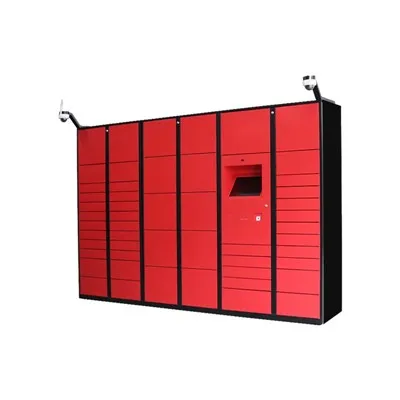


Integrated Screens, Readers, Scanners, POS, and Printers for Parcel Lockers
The Decision Behind parcel locker electronic accessories
At YS LOCKER, we see that hardware conversations move faster when the operating question is already clear. How should a buyer define terminal devices before a parcel-locker quotation rather than assuming every screen, reader, scanner, payment module, or printer is standard? The goal is not to make a universal promise about one cabinet, software package, or installation method. It is to give overseas B2B buyers a disciplined way to define the project before they compare quotations.
A parcel locker is part of an operating workflow. The workflow includes the operator, delivery team, site team, recipient, and sometimes a separate software or integration partner. When those roles are not defined, a project can have a cabinet layout but no reliable agreement on handover, exceptions, information flow, or acceptance. We recommend recording the expected workflow in plain language and treating it as a design input.

Separate Project Options From Standard Assumptions
A useful hardware discussion begins with the user and courier workflow, software responsibility, installation position, specified devices, operating-system choice, and project-specific testing. Buyers should first specify who uses the device, the required user journey, preferred operating system, screen size, specified hardware supplier, software owner, installation environment, and test requirements. This stops a quotation from silently combining visual requests, workflow assumptions, and optional terminal devices into one undefined scope.
For project evaluation, YS LOCKER can review cabinet dimensions, door mix, colors, surface graphics, door structures and selected electronic components. Depending on the project, the electronic scope can be evaluated around Android or Windows, 10.1-inch, 15-inch or 21.5-inch screens, card readers, QR scanners, POS modules and printers. These are project-evaluation options, not a statement that every model contains every component. The target configuration, software responsibility and final bill of materials must be confirmed before production.

Ask for Evidence That Matches the Model
Start with the question that is closest to the buyer's real risk. For this topic, that is the user and courier workflow, software responsibility, installation position, specified devices, operating-system choice, and project-specific testing. Build a short table that lists the current condition, the owner who can confirm it, the evidence available, and the decision still needed. This produces a clearer request for quotation and a more useful technical review.
The table should not stop at the cabinet. It should cover the physical layout, delivery and collection sequence, terminal devices where required, network and power conditions, operating software, and the site team's role after commissioning. Where a function belongs to the customer's platform or a third-party platform, identify it clearly. Where it is a project-specific customization request, identify it as a request rather than a standard claim.
Use a Controlled Approval Path
Before a commercial proposal is finalized, buyers should be able to answer these questions:
1.What is the actual user and operator workflow at this site?
2.Which cabinet layout, door mix, terminal devices, and site conditions are required for that workflow?
3.Which party owns software, data, notifications, access rules, and exception handling?
4.What drawings, protocol files, artwork, or site documents are available for review?
5.Which items still require confirmation by the customer, site owner, or local project team?
This approach is especially important for multi-party projects. The same cabinet can be part of a residential, retail, campus, commercial-property, or carrier-operated workflow, but the responsibility model will not be the same. A clear brief keeps the equipment scope aligned with the operation that will use it.
What YS LOCKER Can Review

We provide smart locker hardware and can review project-specific cabinet configuration for parcel locker applications. Based on confirmed project requirements, we can discuss the cabinet and door layout, master-and-slave structure, colors and surface graphics, relevant electronic hardware, installation context, and software or system-integration boundary.
Where an operator has its own software or works with another platform, we can review lock-control board API or protocol requirements for the project. Where terminal software, cloud management, status information, reporting, access methods, or other functions are requested, their actual scope must be defined in the technical solution. This distinction helps buyers avoid treating a proposed option as a universal product feature.
FAQ
Is this a fixed configuration for every parcel locker?
No. Cabinet structure, door mix, electronics, software scope, and installation approach are confirmed for the project. The purpose of this guide is to help buyers prepare the right inputs before configuration review.
Can YS LOCKER work with an existing operating platform?
For projects using customer-owned or third-party software, we can review lock-control board API or protocol integration. The responsibilities, fields, workflows, and test scope must be confirmed with the relevant project parties.
What should be shared before requesting a quotation?
Share the operating scenario, site plan or photographs, estimated parcel profile, cabinet and door requirements, power and network conditions, selected electronic devices, software ownership, and any available interface or brand documents.
Are images or screens required before the technical review?
They are helpful when the project includes a particular layout, visual identity, terminal interface, or installation condition. They should be treated as project inputs and approved alongside the technical requirements.
Plan the Brief With YS LOCKER
A stronger parcel locker project starts with an agreed operating brief, then moves into configuration, technical confirmation, and quotation. YS LOCKER can review the information for parcel locker electronic accessories and discuss the hardware and integration boundary that fits the confirmed project scope. provide the workflow, preferred terminal devices, any nominated supplier information, software owner, and site conditions for an electronics-configuration review.